





General
From Offline to Online: eCommerce Website Development for UAE Manufacturers
Aakash Ashok|Sep 25, 2026|Read 5 Min




If you're a BigCommerce merchant wondering whether it's time to move, you're not alone. Hundreds of brands have made the switch over the past year, and their reasons go well beyond features. The conversation has shifted to money.
On June 1, 2026, BigCommerce introduced an Open Payment Provider Fee of 0.6% to 2% on every order processed outside its approved gateway list. For years, BigCommerce's strongest argument against Shopify was straightforward, no transaction fees. That argument no longer holds.
For a brand doing $5M a year, a 1% fee quietly eats $50,000 in annual revenue. That is not a platform preference. That is a business problem.
The new fee is only part of the picture. The broader cost comparison was already tilting toward Shopify before June 2026.
BigCommerce vs Shopify
BigCommerce's pricing model ties plan upgrades to revenue thresholds. The more your business grows, the higher your tier, even if you never needed what that tier includes. Shopify's monthly plans are fixed. You pay for what you choose, not for how well your store is performing.
Not every brand is at the tipping point. But certain patterns show up consistently in stores that have stayed too long on a platform that stopped serving them.
Your team is spending more hours managing the platform than actually growing the business. Every customization, even a minor one, requires a developer. Your app stack is a collection of tools that barely talk to each other, stitched together to cover gaps the platform should handle natively. Performance slips during traffic peaks, right when it matters most. And plan upgrades are arriving not because you need new features, but because your revenue crossed a threshold.
If more than one of these sounds familiar, the platform is likely costing you more than your monthly subscription fee.
One of the most common fears before a BigCommerce to Shopify migration is losing something important. Here is an honest breakdown.
Products transfer cleanly, including titles, descriptions, images, variants, SKUs, pricing, and inventory levels. Customer accounts move with contact details and address history. Order history comes across for continuity in reporting and customer service. Blog posts, pages, and SEO metadata including page titles, meta descriptions, and alt text also migrate successfully.
BigCommerce product categories become Shopify collections, and the mapping needs to be handled deliberately to preserve your navigation logic. Custom product options, variant structures, and third-party integrations do not carry over automatically. Each one needs a Shopify equivalent identified before launch, not after.
Customer passwords cannot be transferred between platforms. This is a platform-level security limitation on both ends. After your Shopify store goes live, you will need to send password reset emails to your customer base. Plan that communication early so your customers are not caught off guard on day one.
Your BigCommerce theme does not transfer either. That is not necessarily a loss. Migration gives you a clean moment to rebuild with Shopify's mobile-first architecture, which matters considerably given that the majority of eCommerce traffic today arrives on a phone.
A migration done properly is methodical. Rushing any phase creates problems that surface at the worst possible time, usually during launch or the first big traffic event.
Step 1: Audit and back up your store. Before anything moves, document what exists. Products, variants, customer data, order history, URL structures, integrations, custom code, and configurations. Export everything from BigCommerce as CSV files and store those backups separately. They are your safety net.
Step 2: Set up your Shopify store. Create your account, keep it password-protected while you build, and configure your core settings like taxes, shipping, payment gateways, staff permissions, and primary currency. Most brands migrating from BigCommerce land on Shopify Advanced or Shopify Plus based on their revenue and operational complexity.
Step 3: Choose your migration method. Three routes exist. Manual CSV import works for smaller stores with simple catalogs and gives you direct control, but requires reformatting since Shopify's import structure differs from BigCommerce's. Migration tools like Cart2Cart, LitExtension, and Matrixify automate the heavy lifting for mid-sized stores and reduce the risk of mapping errors, always run a demo migration first before committing. For stores with large catalogs, custom integrations, B2B workflows, or established SEO rankings, an agency-led migration is the route that protects what you have built.
Step 4: Transfer your data and rebuild the storefront. Start with the product catalog, then customer accounts, then order history. Check variants, images, inventory levels, and SKU mapping carefully at each step. Use this moment to improve your storefront rather than replicate it. Shopify's theme library and mobile-first design standards give you an opportunity to build something better than what you had.
Step 5: Set up 301 redirects. This step is not optional. BigCommerce and Shopify use different URL structures, which means every product, collection, and blog page URL will change. Build a complete URL mapping document before launch, implement all redirects inside Shopify, and submit your updated XML sitemap to Google Search Console immediately after going live. Stores that handle this properly typically see organic traffic stabilize and recover within 60 to 90 days.
Step 6: Test everything, then launch. Run through the full customer journey on staging before anything goes live, homepage to product page, add to cart, checkout, payment, and email confirmation. Test across devices and payment methods. Pick a low-traffic window to launch and watch performance closely for the first few weeks.
Skipping the pre-migration audit is how products go missing and integrations break silently on launch day. Migrating during peak season, especially Q4, is how a technical project becomes a revenue crisis. Forgetting 301 redirects is the single most common cause of organic traffic drops after a migration, and rebuilding that ranking equity can take months.
Assuming every BigCommerce app has a direct Shopify equivalent is a mistake that shows up in post-launch scrambles. Audit your app stack before migration and identify alternatives as part of your setup, not as an afterthought. And rushing the testing phase almost always creates a customer experience problem on day one that takes weeks to repair.
Shopify Sidekick is included in every Shopify plan at no additional cost. It writes product descriptions, builds marketing copy, creates Flow automations, and reads your live store data, all from a single interface. BigCommerce has no native equivalent.
At Codilar, we have built on top of that with Store Decode, an AI-powered audit tool that analyses your store the way a customer actually experiences it and surfaces ranked conversion, performance, and UX gaps before they affect your revenue.
Codilar is a premium Shopify Plus Partner with 11+ years of experience and a team of 240+ specialists. Every migration we deliver is documented for zero downtime, zero data loss, and full SEO preservation.
Beyond the Beach, a UAE-based lifestyle retail brand, came to Codilar to migrate their eCommerce platform to Shopify Plus. The store needed more than a data transfer. It needed features rebuilt from the ground up like virtual try-on for eyewear, a custom loyalty point redemption system at checkout, staff discount logic built through Shopify Functions, and performance improvements across the board. The outcome after migration:
A beautiful store that doesn't translate opportunity into value isn't a viable store, it's a liability. We built something that's both effortless to use and impossible to ignore.❞

Mohammad Aamir | Shopify Practice Head at Codilar
13+ Years of Experience
Codilar has delivered similar outcomes for global brands including Reebok, Oakley, Ajmal Perfumes, and Marina Home across markets in the UAE, Saudi Arabia, and beyond. Explore the full portfolio.
The window to be ready for BFCM 2026 is open right now and it closes soon. 83% of self-managed migrations fail or exceed budget. The brands that have their best BFCM do not migrate in October.
If your team is spending more time managing BigCommerce than growing your business, the numbers are no longer on your side.
A straightforward migration with a clean catalog typically takes two to four weeks. Larger stores with custom integrations, extensive catalogs, or B2B complexity run four to twelve weeks. Always plan your migration window around a low-traffic period.
Not if the migration is handled correctly. A complete 301 redirect plan, intact metadata transfer, and immediate sitemap submission to Google Search Console are the core requirements. Brands that execute this properly see traffic stabilize within 60 to 90 days.
No. For security reasons, passwords cannot be transferred between platforms. After launch, you will need to send your customer base a password reset email so they can activate their accounts on the new store.
Shopify offers a significantly larger app ecosystem, a more intuitive admin, fixed pricing that does not scale with your revenue, a superior checkout, and a platform backed by substantially more R&D investment. BigCommerce has historically offered no transaction fees and strong out-of-the-box B2B features, though both of those advantages have narrowed considerably.
For mid-sized stores, tools like LitExtension, Cart2Cart, or Matrixify are reliable and reduce manual errors. For stores with large catalogs, custom integrations, or significant SEO equity, an agency-led migration gives you the most control and the least risk.
Simple migrations can start around $2,000. Enterprise-level Shopify Plus migrations with custom integrations and large catalogs can exceed $20,000. The cost of getting it wrong, in lost rankings, broken workflows, and recovery time, almost always exceeds the cost of getting it right.
Start with a full audit of your existing store - products, customer data, order history, URLs, and integrations. Back up everything before anything moves. Set up your Shopify store with your core configurations in place, then choose your migration method: manual CSV import for smaller catalogs, a migration tool like LitExtension or Matrixify for mid-sized stores, or an agency-led migration for larger or more complex setups. Transfer your data in order - products first, then customers, then orders. Build your 301 redirect map before launch so no URL goes dark. Test the full customer journey thoroughly across devices before going live, and choose a low-traffic window for your cutover. A Shopify Plus Partner like Codilar can manage the entire process end to end so nothing gets missed.
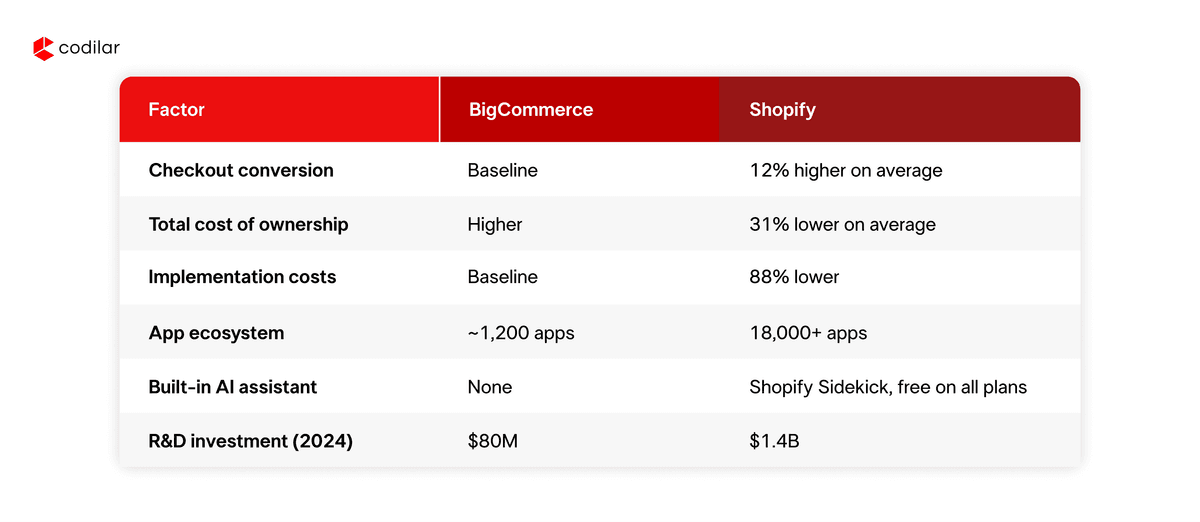
For most growth-focused brands today, Shopify comes out ahead on the metrics that matter most. Shopify's checkout converts 12% better on average, its total cost of ownership runs 31% lower, and its app ecosystem of 18,000+ apps gives merchants far more flexibility than BigCommerce's roughly 1,300 integrations. Shopify also invested $1.4 billion in R&D in 2024 compared to BigCommerce's $80 million, and that gap shows up directly in how fast new features reach merchants. BigCommerce has historically been strong for B2B and was known for charging no transaction fees, but the June 2026 introduction of the Open Payment Provider Fee closed that gap significantly. For enterprise merchants with complex B2B needs, Shopify Plus has also closed the feature gap in recent years with a native B2B suite.
It depends on the size and complexity of your store. A simple migration with a small catalog and minimal customization can start around $2,000. Mid-sized stores with more data, integrations, and design work typically fall in the $5,000 to $15,000 range. Enterprise-level Shopify Plus migrations with large catalogs, custom app development, and ERP or CRM integrations can exceed $20,000. The more useful number to keep in mind is the cost of a migration done poorly in lost search rankings, broken workflows, and the developer time spent in recovery mode. That almost always exceeds the cost of getting it right the first time.
Shopify's main strengths are its ease of use, its checkout performance, predictable flat-rate pricing, an enormous app ecosystem, and a platform that Shopify continues to invest in heavily. Shopify Sidekick, its built-in AI assistant, is included in every plan at no additional cost. The cons are that Shopify charges transaction fees if you use a third-party payment gateway, and highly custom checkout logic requires Shopify Functions or apps. BigCommerce's strengths have been its native B2B features, no per-transaction fees historically, and strong built-in SEO controls. Its cons include a steeper learning curve, revenue-based plan upgrades, a smaller developer community, and limited app ecosystem depth. The June 2026 payment provider fee has also removed what was BigCommerce's clearest differentiator against Shopify.
Both are cloud-based eCommerce platforms, but they are built with different priorities. Shopify is designed to be accessible to a wide range of merchants, from first-time store owners to enterprise brands on Shopify Plus, with a clean admin, a massive app marketplace, and a checkout that is optimized for conversion. BigCommerce is built more for merchants who want deep native functionality out of the box and are comfortable with a more technical setup. Shopify charges transaction fees on third-party gateways; BigCommerce traditionally did not, though that changed in mid-2026. Shopify's ecosystem of apps, themes, and developers is substantially larger. BigCommerce gives more control natively over certain B2B and catalog features, though Shopify Plus has largely closed that gap. In practice, the biggest differences merchants notice day to day are how easy it is to make changes without a developer, how well the checkout performs, and how quickly the platform delivers new features.

Get tailored technology solutions to scale your retail business online
Request A Quote

Stay ahead with insights, trends, and brand success stories from the world of Digital Commerce.


DTECH, Techno Hub 1, Dubai Silicon Oasis Authority, United Arab Emirates - Dubai - United Arab Emirates

Level 1, Building 7, Zone A Airport road, Business Gate P.O Box 93597 Riyadh 11683, KSA.


Codilar Digital Pte Ltd, 68 Circular Road, #02-01, 049422, Singapore

7th Floor, Jupiter Block Prestige Tech Park, Kadubeesanahalli, Bellandur Amtankere, Bengaluru, Karnataka 560103

Satrio Tower, Floor 6, Unit C and D, Desa/Kelurahan Kuningan Timur, Kec. Setiabudi, Kota Adm. Jakarta Selatan, Provinsi DKI Jakarta