





Magento Tutorial
How Tideways Helped Us Uncover the Hidden Bottlenecks in a Slow Magento PLP
Mahaveer Devabalan|Dec 26, 2025|Read 3 Min



A database is a term we all have heard a lot of times from different people, but what actually is a database? Talking in layman’s language we can say that it’s a storage mechanism for storing the data. But, in technical terms it is the backbone of all the applications, be it mobile applications, web applications or system applications. Databases store the interaction of the users and keep the data intact into a relational schema, for reusability.
Hence we can say that no application is a complete application without a database.
For an application platform like Magento, having a market share of about 30% in the eCommerce business, the database is a key element and needs to be scalable, optimized, secure, and customizable. Since Magento provides high scalability (one of the major reason for such high market coverage), accordingly the database should be highly customizable. In order to achieve all the above specifications, Magento selected the EAV-Model to be the best applicable database model for this scenario. Since there are many debates on the acceptability of the EAV as compared to Flat tables, you can weigh the pros and cons of it explained ahead in the blog.
The EAV model used by Magento has three components.
Before we go into Magento database and architecture, let’s discuss them taking a real-life example.
Entity – Entity can be anything that has properties, currently what I see in front of me is a small whiteboard marker, here Entity is Marker.
Attribute – Attribute of a marker can be length, color, thickness, marker_type.
Value – For each of the attribute will have a value.
length => 6inch
color => black
thickness => .2mm
marker_type => permanent
This is EAV model in a nutshell.
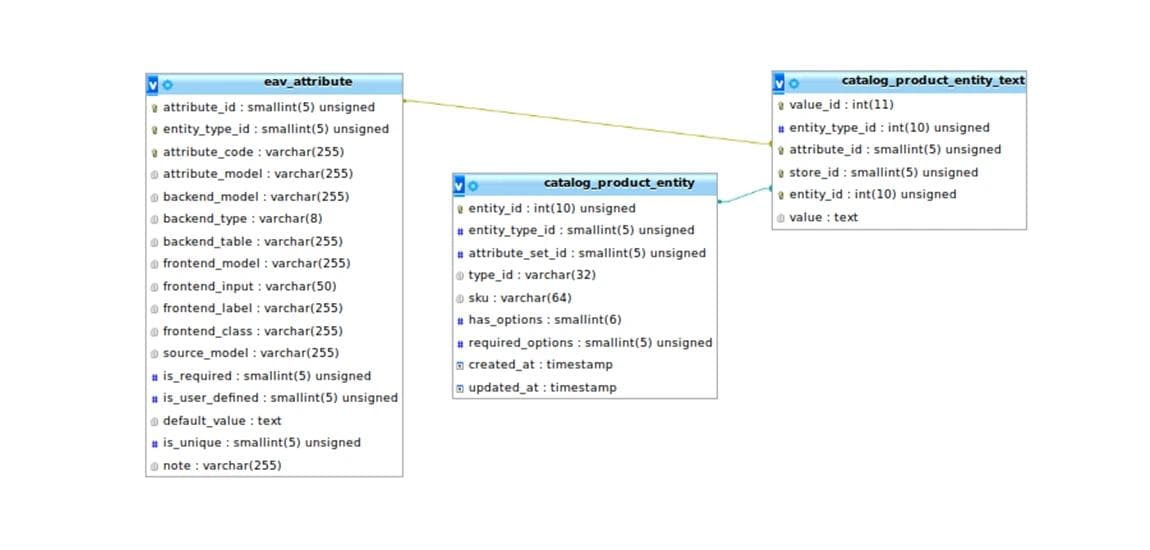
So Adobe Commerce (Magento) has customized and optimized the database and added restrictions and functionality accordingly. Talking about the techies, each of them knows about data types as we have them in every language. MySQL already has different data types, and Magento also introduces data types as a layer over it. Data types such as int, DateTime, varchar, text, decimal are introduced in Magento to segregate the values based on the attribute type.
In Adobe Commerce (Magento) attribute can be of various types, such as:
Each of the above attribute types has a different method to save the values and a different architecture to store data, keeping reusability in mind.
(Note: Always consider the usage area in mind while creating any new attribute. For example, if you want the attribute that should filter the products on front end you must always use the select type or the multi-select type.)
Let’s discuss the attribute type considering our above example, where we discussed a Marker pen.
1. Length => 6 inches.
Length of the marker can be anything, so we can keep it as a text. (if we are using for only showing this attribute)
2. Color => black
Now, this is something that the customer might consider while making the purchase of the marker and might use layered navigation or filters to get the particular one.
3. Thickness => .2mm
Again, it can be just for showing purpose as it does not affect the user selection.
4. marker_type => permanent
Considering marker_type this might be something that can affect the purchase decision of the customer.
Hence, one should make attributes considering the scope of the attribute and usability and this gives us the scalability.
Readers, I know the above this is too complex to understand, so let me explain this a bit more using the same above example in the next topic.
Understanding Magento's EAV Architecture
Magento's Entity Attribute Value (EAV) model is one of the core architectural concepts that enables the platform's flexibility and scalability. By understanding how Magento stores and manages product attributes, developers can build more efficient, maintainable, and high-performing Adobe Commerce solutions. Whether you're creating custom attributes or optimizing database performance, mastering Magento EAV is essential for successful Magento development.
Build scalable Adobe Commerce solutions with Codilar Technologies.
Magento's Entity Attribute Value (EAV) model is one of the core architectural concepts that enables the platform's flexibility and scalability. By understanding how Magento stores and manages product attributes, developers can build more efficient, maintainable, and high-performing Adobe Commerce solutions. Whether you're creating custom attributes or optimizing database performance, mastering Magento EAV is essential for successful Magento development.
Build scalable Adobe Commerce solutions with Codilar Technologies.
Magento EAV (Entity Attribute Value) is a database model that stores data dynamically by separating entities, attributes, and attribute values. It enables Magento to manage large numbers of customizable product attributes while maintaining flexibility and scalability.
Magento uses the EAV model because it allows merchants and developers to add new product attributes without modifying the database schema, making Adobe Commerce highly customizable and suitable for complex eCommerce catalogs.
The Magento EAV model consists of three components: Entity, which represents an object such as a product or customer; Attribute, which defines a property of that object; and Value, which stores the corresponding data for each attribute.
Selecting the appropriate attribute type helps Magento store and retrieve data more efficiently. Proper attribute configuration also improves layered navigation, product filtering, search functionality, and overall store performance.
Understanding Magento database architecture helps developers create scalable extensions, optimize queries, improve application performance, and implement custom features using Magento best practices.

Get tailored technology solutions to scale your retail business online
Request A Quote

Stay ahead with insights, trends, and brand success stories from the world of Digital Commerce.


DTECH, Techno Hub 1, Dubai Silicon Oasis Authority, United Arab Emirates - Dubai - United Arab Emirates

Level 1, Building 7, Zone A Airport road, Business Gate P.O Box 93597 Riyadh 11683, KSA.


Codilar Digital Pte Ltd, 68 Circular Road, #02-01, 049422, Singapore

7th Floor, Jupiter Block Prestige Tech Park, Kadubeesanahalli, Bellandur Amtankere, Bengaluru, Karnataka 560103

Satrio Tower, Floor 6, Unit C and D, Desa/Kelurahan Kuningan Timur, Kec. Setiabudi, Kota Adm. Jakarta Selatan, Provinsi DKI Jakarta