

Shopify Checkout Extensibility 2026: The August 26 Deadline Every Non-Plus Merchant Is Ignoring



Listen Full Blog Here
Key Takeaways
- »August 26, 2026, is the hard deadline for every non-Plus Shopify store to upgrade to Checkout Extensibility or face an automatic upgrade with all legacy customizations removed.
- »Google Ads, Meta pixel, GTM containers, affiliate scripts, and post-purchase apps all stop working after the auto-upgrade, with no visible storefront error.
- »Checkout.liquid, Additional Scripts, and Shopify Scripts are replaced by Checkout UI Extensions, Shopify Pixels, Shopify Functions, and the Checkout Editor.
- »Stores not yet migrated are already losing attribution data today because Shopify has stopped passing PII to Additional Scripts on legacy pages since August 2025.
- »Checkout UI Extensions for core checkout steps are available on Shopify Plus only. Non-Plus merchants can only customize the Thank You and Order Status pages.
On August 26, 2026, Shopify auto-upgrades every store on the Basic, Shopify, and Advanced plans. Every tracking pixel, Google Ads tag, Meta pixel, and GTM container in the Additional Scripts field of your Shopify checkout page stops firing that day. Orders keep coming in, but ad platforms go blind. Most merchants will not notice until their ROAS collapses and the team spends days chasing a problem that was never in the campaigns.
This is not a Shopify Plus story. Plus stores had their deadline in August 2025. The August 26, 2026 deadline applies to every non-Plus Shopify store, regardless of size or revenue. If your store runs tracking pixels, post-purchase scripts, or any custom code on your Thank You or Order Status pages, this is your deadline to act.
With 49 days remaining, the window for a planned migration is narrowing fast. This guide covers everything non-Plus merchants need to know, understand, and take action before that date.
What Is Shopify Checkout Extensibility and Why Does It Matter in 2026?
Shopify Checkout Extensibility replaces how checkout customization works across the entire platform. It retires checkout.liquid, Additional Scripts, and Shopify Scripts, the three legacy methods merchants used to inject custom code into the Shopify checkout page, and replaces them with four structured, sandboxed tools. The new system isolates custom code from Shopify's core checkout environment, making it more secure, faster, and immune to breaking on platform updates.
The following are the four tools replacing the legacy system. Each legacy customization method maps directly to a replacement tool. Understanding that mapping is what makes the migration manageable rather than overwhelming for non-technical merchant teams.
Checkout UI Extensions (Replaces checkout.liquid visual customizations)
React-based components that add custom elements, including fields, banners, upsell offers, and trust badges, to specific checkout regions without directly editing any template file.
Shopify Pixels and Web Pixels (Replaces Additional Scripts and app script tags)
Sandboxed tracking scripts managed in Settings → Customer Events. Google Ads, Meta pixel, TikTok, Pinterest, and affiliate tracking all move here from the deprecated Additional Scripts field.
Shopify Functions (Replaces Shopify Scripts)
Server-side business logic running in a WebAssembly sandbox. Custom discounts, shipping rules, and payment method controls move here from Ruby-based Shopify Scripts.
Checkout Editor (Replaces Script-based post-purchase page customizations)
Visual drag-and-drop in Shopify admin for managing app blocks and layout on the Thank You and Order Status pages, requiring no code for standard customizations.
What is Changing on August 26, 2026: The Non-Plus Shopify Checkout Deadline Explained
Shopify Checkout Extensibility has been rolling out in stages since 2023. Plus, stores met their deadlines in 2024 and 2025. August 26, 2026, is the stage that applies to every Basic, Shopify, and Advanced plan store, and it is the one that has received the least attention despite affecting the most merchants.
On that date, Shopify auto-upgrades every non-Plus store. Any Additional Scripts, app script tags, or deprecated customizations on the Shopify Thank You page and Order Status page are removed, not migrated. Official Shopify channel apps may carry over. Custom tracking pixels, GTM containers, affiliate scripts, and anything pasted directly into the Additional Scripts field do not.
Here is what that means in practice:
What stops working after August 26, 2026?
- Google Ads conversion tracking goes silent: Campaigns stop reporting conversions, Smart Bidding starts optimizing against zero-value events, and ROAS collapses within two to three days, with no obvious explanation in the ad account.
- Meta pixel purchase events stop firing: CAPI attribution breaks, retargeting audiences stop updating, and lookalike campaigns lose the purchase signals they depend on.
- Affiliate tracking scripts go dark: Commissions are no longer attributed correctly. Partner relationships that depend on post-purchase confirmation events break silently.
- Post-purchase upsell apps built on script injection stop loading: Any app that uses script tags on the Thank You or Order Status page to display offers, surveys, or loyalty prompts stops functioning after the auto-upgrade runs.
What Breaks if You Miss the Shopify Checkout Extensibility Deadline
The auto-upgrade on August 26 does not break the checkout itself. Orders are processed normally, and customers complete purchases without seeing any error. However, the damage happens in the systems that depend on what used to live in Additional Scripts and script tags on the Thank You and Order Status pages. Most merchants will not know anything is wrong until the data stops making sense. What breaks depends on how the store is set up.
The scenarios below cover the most common breakages across non-Plus Shopify stores, based on how merchants typically use Additional Scripts and script-injecting apps today:
- Google Ads tracking: Conversion tags in Additional Scripts stop firing, Smart Bidding optimizes against zero data, and ROAS collapses within days.
- Meta pixel events: Purchase events stop sending, retargeting audiences lose signals, and lookalike campaigns degrade over weeks.
- GTM containers: All tags inside GTM go dark simultaneously, including GA4, Pinterest, TikTok, and Bing Ads.
- Affiliate tracking: Commission attribution breaks. Partners stop receiving confirmation events and may pause traffic.
- Post-purchase apps: Upsell offers, surveys, and loyalty prompts built on script tags stop rendering on the Thank You page.
Shopify Checkout Extensibility: What Replaces Additional Scripts, checkout.liquid, and Script Tags
Every legacy customization has a supported replacement in the new framework. Tracking pixels and conversion tags are moved to Shopify Pixels in Settings, then to Customer Events. Google and Meta have officially managed pixel apps that handle this automatically. For platforms without a managed app, Custom Pixels let merchants paste tracking code into a sandboxed environment that survives future Shopify updates.
Post-purchase upsell and survey apps need to be rebuilt on Checkout UI Extensions. If an installed app has not been updated by its developer to support Checkout Extensibility, it will not work after the upgrade. Check each app in the personalized upgrade guide in Shopify admin under Settings, then Checkout. Apps flagged as incompatible must be replaced with Checkout Extensibility-compatible alternatives from the Shopify App Store by August 26.
Also Read: https://www.codilar.com/blog/store-decode
How to Audit Your Shopify Store Before the August 26 Deadline: A Step-by-Step Checklist
Completing the audit before August 26 takes most stores between one and four hours, depending on how many customizations are in place. Start now, and there is time to migrate without developer pressure.
- Step 01: Go to Settings, then Checkout in Shopify admin. Check for a yellow upgrade banner in the Configurations section. If present, click Review Customizations.
- Step 02: Open the Additional Scripts field in Checkout settings. Copy every script into a document before August 26. After the deadline, this field becomes inaccessible.
- Step 03: Check Settings, then Customer Events. Confirm that your Google and Meta Pixel apps are installed and active as managed pixels, not as script injections.
- Step 04: Review every installed app that touches checkout. Ask the developer or check the App Store listing: is this app compatible with Shopify Checkout Extensibility? Incompatible apps need replacing.
- Step 05: Place a test order after migrating. Verify Google Ads and Meta purchase events fire correctly on their respective platforms. Check that all Thank You page content loads as expected.
Shopify Plus vs Non-Plus: How Checkout Extensibility Works Differently Across Plans
Checkout Extensibility is not the same experience across all Shopify plans. Understanding the difference matters because several features merchants associate with Checkout Extensibility are Plus-exclusive.
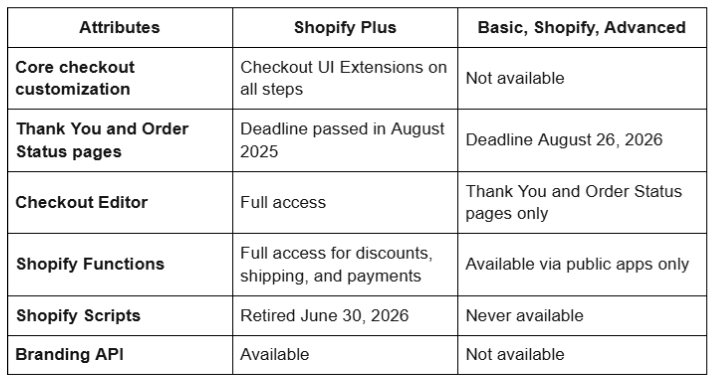
The most important distinction for non-Plus merchants: Checkout UI Extensions for the information, shipping, and payment steps of the checkout flow are available exclusively on Shopify Plus. Non-Plus stores can customize the Thank You and Order Status pages using the new framework, but the core checkout steps remain Shopify's controlled environment on all plans below Plus.
If deeper checkout customization is a business requirement, that is one of the strongest commercial cases for upgrading to Shopify Plus.
Migrate Your Shopify Store to Checkout Extensibility Before August 26
The August 26 deadline less than two months away. For stores with direct tracking setups, the migration is a weekend of focused work. For stores with multiple ad platforms, custom apps, COD flows, or complex GTM configurations, developer involvement and sufficient lead time are required to test properly before go-live.
Codilar's Shopify development services cover the full Checkout Extensibility migration, including tracking audit, Web Pixel setup, app compatibility review, custom extension development, and post-migration testing across every checkout path. As a Shopify Plus expert agency working across both Shopify and Shopify Plus, Codilar has completed migrations for merchant setups of all complexity levels.

FAQs
Yes. The August 26 deadline applies specifically to Basic, Shopify, and Advanced plan stores. Shopify Plus stores had their deadline in August 2025. If your store was created before January 6, 2025 and has any customizations on the Thank You or Order Status pages, this deadline is yours to act on.
The checkout keeps processing orders. What breaks silently is everything downstream. Google Ads stops recording conversions, Meta pixel stops firing, and post-purchase apps stop loading with no visible storefront error. Most merchants only discover the problem when ROAS collapses two to three days after the auto-upgrade runs.
Go to Settings, then Checkout in Shopify admin. If no yellow upgrade banner appears in the Configurations section and your Additional Scripts field is empty or locked, the store is already on the new system. If the banner is present, migration is still pending.
nstall the Google and YouTube channel app for GA4 and Google Ads conversion tracking. Install the Facebook and Instagram channel app for Meta pixel and Conversions API. Both handle the migration automatically without custom code. For platforms without an official app, create a Custom Pixel in Settings, then Customer Events.
Not on the core checkout steps. Custom fields on the information, shipping, and payment pages require Checkout UI Extensions, which are available on Shopify Plus only. On non-Plus plans, customization is limited to the Thank You and Order Status pages using the Checkout Editor and compatible apps from the Shopify App Store.

eRetail Growth
in Mind?
Get tailored technology solutions to scale your retail business online
Request A Quote


Subscribe to
Stay in Know
Stay ahead with insights, trends, and brand success stories from the world of Digital Commerce.