





Performance Optimization
What Is The Difference Between AEM and Adobe Commerce
Jayanka Ghosh|Apr 29, 2025|Read 5 Min



Shopify Scripts, the Ruby-based tool for customizing Shopify Plus checkout, stopped running on June 30, 2026. Discount, shipping, and payment logic that still lived in the Script Editor no longer executes, and Shopify Functions is the supported replacement.
If you already migrated, this guide shows how Functions differ from Scripts and how to tighten what you built. If gaps remain, it walks you through auditing your checkout and rebuilding the logic.
Let’s unpack how Functions work, why they are the stronger foundation, and how to finish the migration.
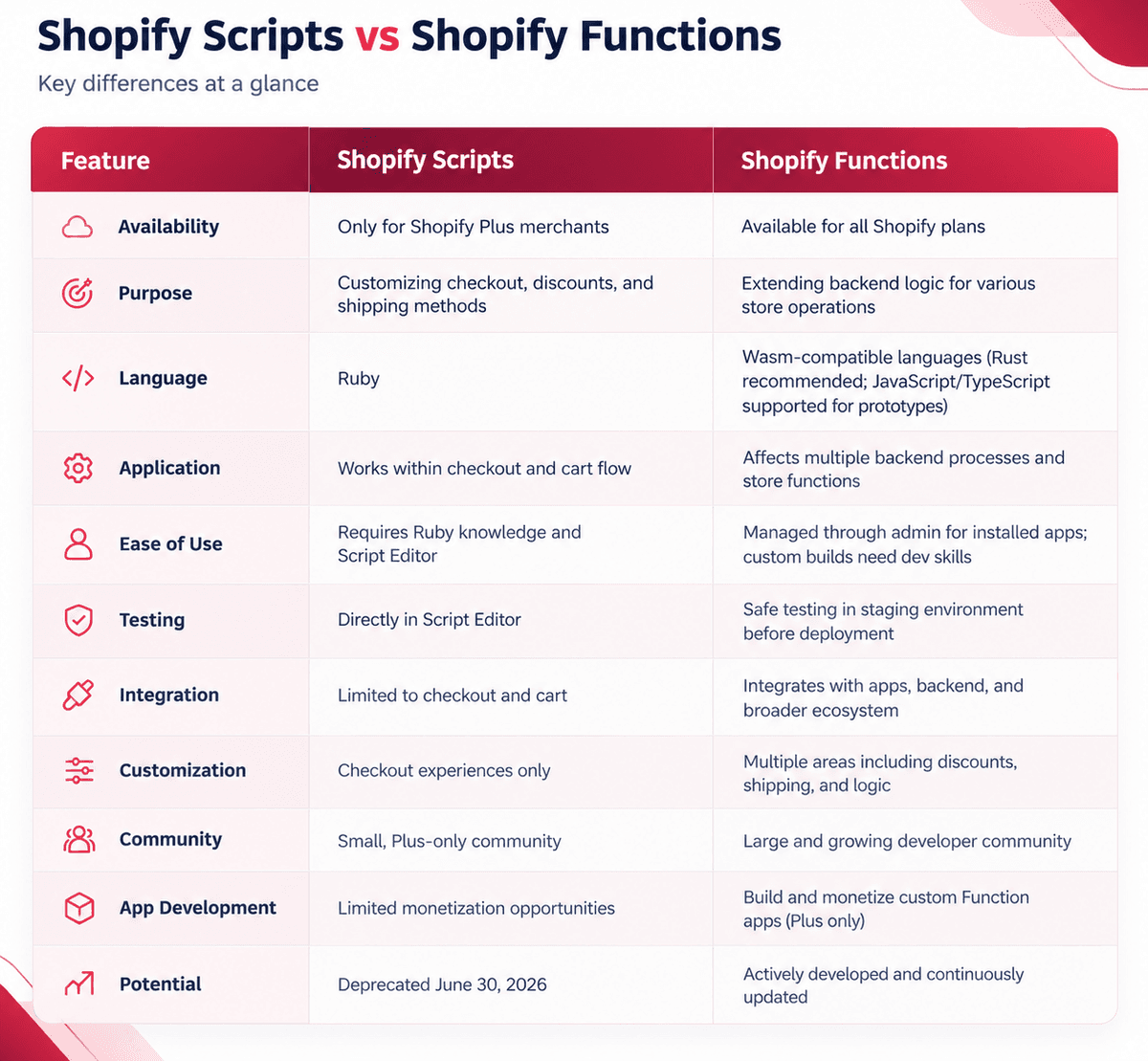
For years, Shopify Scripts were the crown jewel of Shopify Plus. They let merchants customize line item discounts, shipping rates, and payment methods at checkout. Scripts were written in Ruby and ran inside the Script Editor app, so most changes needed a developer who knew both Ruby and the editor, and the scope stayed within checkout logic.
Shopify Functions take a different approach. They are small programs compiled to WebAssembly (Wasm) that Shopify runs on its own infrastructure at defined points in checkout and the backend. Rust is the recommended language for production, and JavaScript works well for prototyping.
Functions ship inside apps, so public apps can bring the same capabilities to stores on any plan, and merchants can often configure them from the admin without touching code.
Any logic still running on Scripts stopped on June 30, 2026, so affected rules fall back to Shopify’s default checkout behavior. Check these first:
Scripts are gone, so the question has moved from whether to migrate to how well your Functions are built. Here is why Functions are the stronger foundation.
Shopify Functions gives you the freedom to extend backend logic to fit your exact business needs. From custom discount rules to personalized shipping rates and checkout experiences, everything can be modified, scaled, and integrated more intuitively.
And because these functions can be managed directly in your admin panel through installed apps, non-technical teams can handle configuration without needing to call a developer for every small change. It’s a win for efficiency and scalability.
Functions run on Shopify’s managed infrastructure in a sandboxed Wasm runtime, so you do not provision or scale servers for checkout logic. Each Function has strict instruction-count and size limits because several can run during one checkout request.
Performance depends on your implementation, cart size, and language. Rust compiles directly to Wasm and gives the most headroom, while JavaScript functions carry extra runtime overhead and reach limits sooner. You can measure instruction counts in the Dev Dashboard and with Shopify CLI.
From apps to backend processes, Functions integrate with Shopify’s entire ecosystem, while Scripts were confined within checkout. This allows smoother, unified workflows. For instance, you can create logic that ties together product data, discount conditions, and fulfillment settings, all operating seamlessly across your store.
With Functions, you get an eCommerce ecosystem that’s more cohesive and future-proof.
Developers can test Functions before they reach shoppers. Shopify CLI runs a function locally against sample input and can replay recent executions, and development stores let you exercise discount, delivery, and payment logic safely. Functions ship as part of app versions, so you can release changes through your normal app workflow.
Scripts often required Ruby developers for even small changes. Shopify Functions lowers that barrier. Once a Function-based app is installed, merchants can configure, toggle, and update it from the admin panel without touching code.
It’s a huge advantage for teams that want to reduce overhead and empower non-technical members to manage store logic.
Functions run inside Shopify’s infrastructure, so you do not host or secure your own servers for checkout logic. Each Function receives only the data defined in its input query.
This is one of the biggest shifts: Functions reach well beyond Plus. Stores on any plan can use public apps from the Shopify App Store that contain Functions.
Only Shopify Plus stores can use custom apps that include Function APIs, and a few capabilities are limited to Plus. Check Shopify’s Function APIs reference for current availability.
Shopify continues to invest heavily in Functions, expanding supported APIs, improving performance, and releasing new customization points. The Functions framework is central to Shopify’s long-term path for checkout customization.
Scripts have stopped running, so migration is now a recovery and cleanup project. The plan below still applies: audit what you had, rebuild it, test it, and monitor it. If you migrated before June 30, use the post-migration steps to confirm everything behaves correctly.
Shopify provides a migration guide and a growing set of Function-based apps that replicate or extend what Scripts did.
Before diving headfirst into the migration, it’s crucial to understand what exactly you’re working with. Scripts may look simple on the surface, but many stores use multiple layers of custom logic that interact with discounts, shipping rates, or third-party integrations. Start by identifying and mapping everything clearly.
1. Audit your existing Scripts
Open Apps > Script Editor and review the Scripts customizations report. It lists detected customizations for payment gateways, shipping, and product discounts, with links to replacement apps or Function tutorials. Then make a detailed list of every Script in your store and note what each one does, such as discounting, shipping adjustments, or checkout tweaks. This shows you the scope of work ahead.
2. Review dependencies
Some Scripts rely on external apps or APIs. Make a note of which ones interact with other systems or partner integrations. You’ll need to rebuild those connections once you move to Functions.
3. Evaluate priority and impact
Not all Scripts are equally important. Some may bring only minor visual or pricing tweaks, while others affect your conversion flow directly. Rank them by business importance so you can tackle high-impact ones first.
4. Understand Shopify Functions
Spend some time with the official documentation. Functions are Wasm modules that take JSON input from a GraphQL query and return JSON output. Rust is Shopify’s recommended choice for production, and JavaScript suits prototypes.
5. Set up your development environment
Your developers can use Shopify CLI and a development store to build, run, replay, and deploy Functions.
6. Back up everything before touching anything
Keep copies of your Script code, discount configurations, and a note of the expected checkout behavior for each rule. You will use them to verify the rebuilt logic.
Now that you know what you’re working with, it’s time to get your hands dirty. This is where your old Ruby-based Scripts transform into modern, lightweight Functions that run faster and integrate better with Shopify’s ecosystem.
1. Rebuild your logic using Shopify Functions
Go script by script, rewriting your logic as Functions. If you are new to Wasm or Rust, start with simpler discount or shipping logic. Use JavaScript for quick prototypes, and use Rust for production builds, especially in public apps or for carts with many line items, to stay within instruction limits.
2. Explore prebuilt Function apps before custom coding
You might be surprised how many apps already exist in the Shopify App Store that handle common use cases. Whether it’s tiered discounts, custom shipping rates, or volume-based pricing, check if a Function-based app already does the heavy lifting. This can save hours of development time and reduce maintenance later.
3. Use Shopify CLI for testing and deployment
Shopify CLI is your control center during migration. It lets you test Functions in isolated environments, push updates safely, and roll back to earlier versions when needed. Treat it as your sandbox before going live.
4. Validate and stress test thoroughly
Once your Function is up and running, test it across every scenario. Apply multiple discount combinations, simulate high-traffic situations, and see how it interacts with your checkout process. Functions run during checkout, so even small mistakes can ripple through user experiences if you skip testing.
5. Review data consistency and performance
Compare outputs against your old Script rules and check analytics and logs for price miscalculations or checkout delays.
6. Deploy confidently
Once you’re satisfied with testing and validation, it’s time to go live. The best practice is to deploy during a low-traffic window, like late night or early morning, to minimize any risk. Keep monitoring closely for the first 24 hours, and have your backup handy in case you need to roll back.
Once your Functions are live, your job isn’t done yet. Migration success isn’t just about switching technologies; it’s about ensuring your store continues to run smoothly under the new system.
The post-migration phase focuses on observation, refinement, and long-term sustainability.
1. Monitor your store closely
Keep a close eye on how your Functions behave across live traffic. Watch your conversion rate, checkout speed, and discount accuracy during peak hours. It’s normal to discover small quirks that didn’t appear during testing.
2. Track performance metrics
Track checkout latency, error rates, and conversion after launch, and review instruction counts in the Dev Dashboard so you can see how close each Function runs to its limit.
3. Check compatibility with third-party apps
Some older apps might still rely on Script-level interactions. If anything starts behaving oddly, check the developer’s documentation or contact support to confirm that the app supports Shopify Functions. In most cases, a quick update or patch resolves such issues.
4. Gather customer and staff feedback
Sometimes your analytics might look perfect, but your customers could still face subtle issues like coupon errors or shipping inconsistencies. Ask your support team to log any customer reports during the first week after migration. These small clues can reveal bugs early.
5. Refine and optimize your Functions
After gathering initial feedback, revisit your code. Can anything be simplified? Can logic be merged for better efficiency? Functions are designed to be modular, so you can always refine them without rewriting everything.
6. Remove leftover Scripts
Scripts still listed in the Script Editor no longer run. Remove them to keep your records clean, and document where each rule now lives.
7. Maintain an ongoing update routine
Functions evolve rapidly as Shopify releases new APIs and customization points. Schedule quarterly reviews to ensure your code stays aligned with the latest updates. This keeps your store compatible with new Shopify features and avoids last-minute scrambles before future platform changes.
Migrating to Shopify Functions means rethinking how your store logic runs in a modular way. Following these best practices can save you hours of rework.
1. Treat gaps as urgent
Scripts no longer run, so any rule you have not rebuilt is not applying at checkout. Prioritize discounts that affect revenue first, then shipping, then payment rules.
2. Migrate one category at a time
Complete discounts, then shipping, then payments. This makes troubleshooting easier and limits the impact if something goes wrong.
3. Use staging environments for testing
Never deploy untested Functions directly to your live store. Set up a staging environment that mirrors your real data and checkout flow. It’s safer, more predictable, and helps catch hidden issues before customers do.
4. Keep a clear rollback plan
Even the best developers occasionally hit bugs. Maintain backups of your Scripts, configurations, and Function versions so you can roll back quickly without disrupting ongoing sales. Having this plan gives your team confidence during migration.
5. Train your non-technical team
Functions can be managed directly through the Shopify admin, so your operations or marketing teams will likely be adjusting settings in the future. Provide a short internal guide on how to configure or disable Functions safely to prevent accidental changes.
6. Keep communication open with customers
If you anticipate temporary checkout changes or downtime during migration, inform your customers in advance. A simple “scheduled maintenance” message helps maintain trust and avoids confusion.
7. Work with Shopify experts if necessary
If your Scripts handle advanced customizations or involve multiple integrations, consider consulting a Shopify expert or agency. They can audit your existing setup and rebuild your logic more efficiently in Function format.
8. Document every change thoroughly
Once migration is done, keep a detailed record of what changed, who implemented it, and where the new Functions live. Future developers and managers will thank you when they need to update or troubleshoot later.
Migration is often seen as a chore, but in this case, it’s more of a strategic upgrade. Shopify is clearly moving toward a more modular, API-driven ecosystem, and Functions are a big piece of that vision.
Here’s what that means for merchants:
By embracing Shopify Functions, merchants gain a technology that replaces Scripts and also opens customization to stores on every plan through apps. That makes it a stronger base for the next stage of checkout work.
Moving from Scripts to Functions takes planning, but the path is clear: audit what you had, rebuild it with the right Function type, test it on a development store, and monitor it after launch. Functions give your store a foundation that runs on Shopify’s infrastructure, works through apps on every plan, and keeps growing with new customization points. The sooner your discount, shipping, and payment rules are rebuilt and verified, the sooner your checkout behaves exactly as you intend.
If your checkout has behaved differently since July 1, Codilar’s Shopify Plus team can audit your discount, shipping, and payment logic and rebuild it as Functions. Start the conversation on our contact page.
Yes. Shopify Scripts stopped running on June 30, 2026. Logic that stayed in the Script Editor no longer applies at checkout, so discounts, shipping rules, and payment rules need to be rebuilt as Functions.
Stores on any plan can use public apps from the Shopify App Store that contain Functions. Only Shopify Plus stores can use custom apps that include Function APIs, and a few capabilities are limited to Plus. Check Shopify’s Function APIs reference for current details.
Open Apps > Script Editor and use the Scripts customizations report, which lists detected customizations and links to replacement apps or Function tutorials. Pair it with your saved Script code and your list of active promotions.
Not always. Many Function-based apps in the Shopify App Store are configured from the admin without code. Custom logic needs a developer who can build in Rust or JavaScript and deploy with Shopify CLI.
Use Rust for production, especially in public apps or when carts have many line items, because it stays within instruction limits more easily. JavaScript works well for prototypes but reaches limits sooner.

Get tailored technology solutions to scale your retail business online
Request A Quote

Stay ahead with insights, trends, and brand success stories from the world of Digital Commerce.


DTECH, Techno Hub 1, Dubai Silicon Oasis Authority, United Arab Emirates - Dubai - United Arab Emirates

Level 1, Building 7, Zone A Airport road, Business Gate P.O Box 93597 Riyadh 11683, KSA.


Codilar Digital Pte Ltd, 68 Circular Road, #02-01, 049422, Singapore

7th Floor, Jupiter Block Prestige Tech Park, Kadubeesanahalli, Bellandur Amtankere, Bengaluru, Karnataka 560103

Satrio Tower, Floor 6, Unit C and D, Desa/Kelurahan Kuningan Timur, Kec. Setiabudi, Kota Adm. Jakarta Selatan, Provinsi DKI Jakarta