




Adobe
BigCommerce to Adobe Commerce (Magento) Migration for Scaling Brands
Aakash Ashok|Oct 16, 2026|Read 6 Min




On August 11, 2026, Adobe stops delivering security patches, bug fixes, and compliance updates for Adobe Commerce (Magento) 2.4.5 and 2.4.6. Both versions hit the same deadline on the same date, affecting thousands of merchants worldwide. The stores that do not upgrade in time do not shut down; they continue processing orders and payments, but simply do so on a platform that Adobe will no longer protect.
The risk that follows the end of support is not theoretical. When Adobe ended Magento 1 support in June 2020, over 7,500 Magento stores were compromised in a single coordinated attack campaign in the months that followed. Attackers specifically targeted stores on unsupported versions because the vulnerabilities were publicly documented and permanently unpatched. The same conditions apply after August 11, 2026, for every store still running 2.4.5 or 2.4.6.
For merchants on 2.4.5, the extended support window Adobe offered at no additional cost since August 2025 ends on August 11. For merchants on 2.4.6, regular support simply ends on the same date with no extension available. The upgrade destination for both groups is Adobe Commerce (Magento) 2.4.8, and a typical upgrade takes 2 to 6 weeks, depending on store complexity. The window is tighter than most merchants realize.
The current latest version of Magento is Adobe Commerce (Magento) 2.4.8, released on April 8, 2025, with regular support running through April 11, 2028. Most implementation partners recommend waiting for 2.4.9-p1 before upgrading production stores, since the .0 release of any major version carries early-adoption risk with third-party extensions that need time to validate compatibility.
The version landscape below shows exactly where every merchant stands as of July 2026:
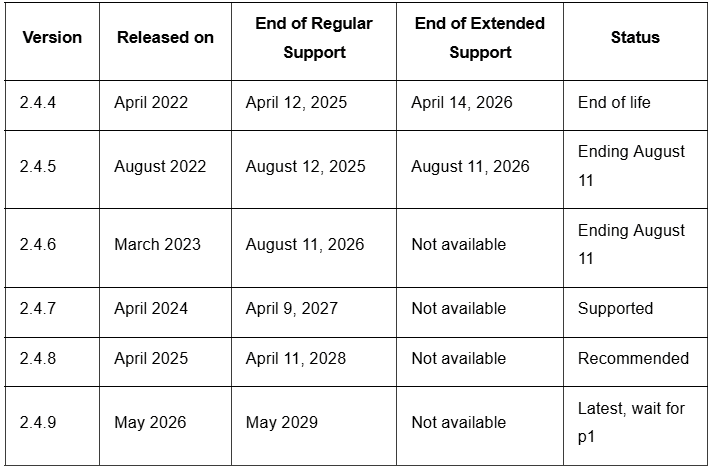
Adobe supports direct upgrades from both 2.4.5 and 2.4.6 to 2.4.8, requiring not to pass through 2.4.7 first. A typical upgrade takes two to six weeks, covering extension audit, compatibility testing, staging environment validation, and go-live. Stores with heavily customized codebases or a large number of third-party extensions sit toward the six-week end of that range.
The end of Adobe Commerce 2.4.5 and 2.4.6 support does not mean the end of operations. The store keeps running, but responsibility for its security shifts entirely from Adobe to the merchant. Every vulnerability discovered after August 11 becomes a permanent exposure with no official patch available. The shift has three distinct consequences:
Security: The Risk That Compounds Daily
Adobe Commerce (Magento) stores process payment data and store customer records at significant volume, making them consistently high-value targets. Over 7,500 Magento stores were compromised in a single coordinated attack in early 2026, the majority of which were running versions with publicly documented, unpatched vulnerabilities. After August 11, every new CVE filed against 2.4.5 or 2.4.6 will remain permanently open. Adobe will not release patches or hotfixes for unsupported versions regardless of severity.
Compliance: PCI-DSS Obligations Do Not Pause for Platform Deadlines
Merchants processing card payments operate under PCI-DSS requirements that include maintaining a secure, patched environment. Running unsupported software is a direct compliance exposure that a qualified security assessor will flag. Adobe explicitly states that PCI compliance will be at risk for merchants who do not upgrade by the end of 2026.
Operational Breakdown: What Stops Working After August 11
Three operational dependencies are already breaking down for stores that remain on 2.4.5.
A store on 2.4.5 in September 2026 carries more technical debt than the same store on August 12. Every month without a supported platform adds unpatched vulnerabilities and compatibility conflicts that make the eventual upgrade more expensive and more complex.
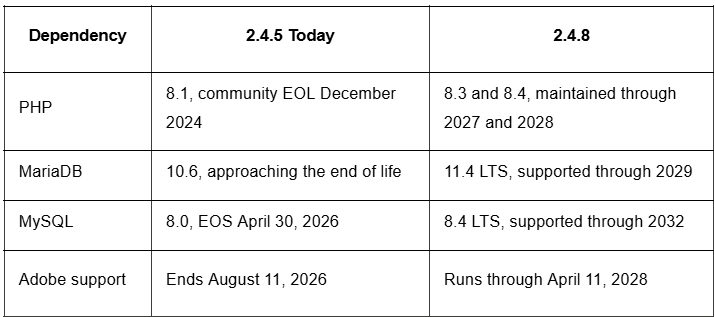
Upgrading from 2.4.5 or 2.4.6 to 2.4.8 is not simply a matter of moving to a supported version, but a meaningful platform advancement. Adobe Commerce (Magento) 2.4.8, released on April 8, 2025, introduces significant changes across infrastructure dependencies, security architecture, API performance, and B2B functionality.
Understanding what changes gives merchants a clearer picture of what the upgrade delivers and what it requires in preparation:
The single most commercially important change in 2.4.8 is at the infrastructure level. Merchants upgrading from 2.4.5 are moving from PHP 8.1, which reached community end of life in December 2024, to PHP 8.3 or 8.4, both of which are actively maintained through 2027 and 2028, respectively.
The Duo Security 2FA implementation updates to Web SDK v4, replacing a deprecated SDK with known weaknesses. REST API access control now restricts admin users to viewing only orders within their assigned website, closing a data exposure issue present in 2.4.5 and 2.4.6. Subresource Integrity support now covers all pages, not just payment pages, protecting against Magecart-style attacks that inject malicious code outside the checkout flow.
Bulk actions on catalog price rules allow multiple rules to be changed or deleted simultaneously, reducing manual overhead for merchants managing complex promotional pricing. Mobile preview for staged content lets teams review promotions and CMS changes on mobile before publishing. Indexer and caching improvements mean stores handle high-traffic events and large B2B order batches more reliably. Bulk API operations, including catalog updates and inventory synchronizations run faster, benefiting any store with an ERP or PIM integration.
What stays the same
The storefront architecture, checkout flow, and admin panel are operationally familiar from day one. Existing custom themes and modules that pass compatibility testing continue working. Merchants are not learning a new platform. They are running the same platform on a fully supported foundation.
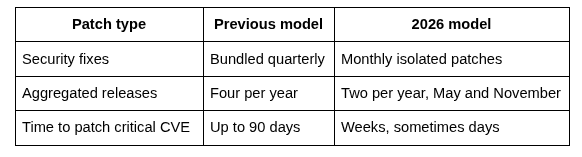
Adobe restructured how it ships security patches in January 2026, replacing the old quarterly model with monthly isolated fixes. For merchants on supported versions, this makes staying current significantly easier. For merchants on 2.4.5 or 2.4.6 after August 11, it makes no difference. The new cadence only applies to supported versions.
Under the old quarterly model, a critical vulnerability could sit unaddressed for up to 90 days before the next patch bundle shipped. The new model closes that window. Adobe now ships monthly isolated security patches addressing specific CVEs as they are discovered, along with two aggregated patch bundles per year, in May and November. Patches are smaller, lower risk to apply, and reach production stores in weeks rather than months.
The latest security patch for Adobe Commerce (Magento) 2.4.5, p17, released in May 2026, addresses vulnerabilities per Adobe Security Bulletin APSB26-49. It adds support for Valkey 8.1 LTS as a cache backend and for RabbitMQ 4.2 compatibility. Merchants on 2.4.5 who have not applied p17 should do so immediately. Running an earlier patch while planning the upgrade to 2.4.8 means carrying known, unaddressed vulnerabilities in the interim.
Note: patches p11 through p17 are available only to Adobe Commerce customers. Merchants on Magento Open Source 2.4.5 cannot apply them and have been without official security patches since August 12, 2025.
Once on 2.4.8, merchants immediately benefit from the monthly patch cadence. Adobe recommends applying patches within 30 days of release. The current recommended production version is 2.4.8-p4. Smaller, targeted patches reduce the risk of regression compared to larger quarterly bundles. For managed hosting merchants, the provider handles patch application. Self-hosted stores need their own patch management process and staging environment.
A typical Adobe Commerce (Magento) upgrade from 2.4.5 or 2.4.6 to 2.4.8 takes two to six weeks. The upgrade includes the following two paths:
Step 1: Environment audit and compatibility check
Document the current PHP version, database version, extension list, and custom module inventory. Run the Adobe Commerce Upgrade Compatibility Tool against the 2.4.8 codebase to identify breaking changes in custom code. Check every third-party extension against the vendor's 2.4.8 compatibility matrix. Extensions without confirmed 2.4.8 support need alternative sourcing or custom development before the upgrade proceeds.
Step 2: Staging environment setup
Build a staging environment that replicates production as accurately as possible, including the same data volume, extensions, and integrations. The staging environment is where the upgrade runs first. Going straight to production without staging is the single most common cause of avoidable go-live failures in Magento upgrades.
Step 3: PHP and database upgrade
Upgrade PHP to 8.3 or 8.4 and migrate the database to MariaDB 11.4 LTS or MySQL 8.4. These infrastructure changes run before the Adobe Commerce (Magento) application upgrade. Merchants on 2.4.5 with PHP 8.1 are making a two-generation PHP jump, which requires validating every custom module and extension against PHP 8.1 before the application upgrade begins.
Step 4: Adobe Commerce (Magento) 2.4.8 application upgrade
Run the upgrade via Composer: composer require magento/product-community-edition=2.4.8 --no-update, then composer update, followed by bin/magento setup:upgrade, setup:di:compile, setup:static-content:deploy, and cache:clean. Direct upgrades from 2.4.5 and 2.4.6 to 2.4.8 are fully supported. There is no requirement to pass through 2.4.7 first.
Step 5: Extension and custom module testing
Test every extension and custom module against the upgraded codebase in staging. Cover all critical user journeys, including product browsing, cart and checkout, payment processing, order management, and any B2B workflows. Extension testing is consistently the longest and most unpredictable step. Budget generously for this phase, especially for stores with five or more third-party extensions.
Step 6: UAT and go-live
Run user acceptance testing with the merchant team covering all operational workflows. Sign off on checkout flows, payment gateways, and any integrations running against live data. Go live on a low-traffic day, keep the previous environment accessible for 48 hours post-go-live for rollback if needed, and monitor orders, integrations, and error logs closely through the first week.
The August 11 deadline is not just a compliance requirement. It is the right moment to address accumulated technical debt, modernize the infrastructure stack, and evaluate whether the current frontend still serves the business. Merchants who treat it as a planned program rather than an emergency response get better outcomes on every dimension, including timeline, budget, and post-launch stability.
Codilar Technologies brings over 240 specialists across Adobe Commerce (Magento), Shopify Plus, AEM, CRO, and performance hosting. For merchants on 2.4.5 or 2.4.6, Codilar provides a structured environment assessment, extension compatibility audit, and an execution plan built around the August 11 deadline.
Ready to start immediately? Codilar's team can begin the pre-upgrade audit within days.
No, it will not break. It will keep running, taking orders, and processing payments as normal. What changes is that Adobe stops protecting it. Any vulnerability discovered after that date stays permanently unpatched. The store functions, but the risk of a breach grows every day without an official patch.
For most merchants, 2.4.8 is the safer choice right now. Adobe Commerce (Magento) 2.4.9 shipped May 12, 2026, and carries early-adoption risk. Third-party extensions need time to validate compatibility with any new .0 release. Upgrade to 2.4.8 to meet the August 11 deadline and move to 2.4.9 once the first patch release, p1, stabilizes it.
Two to six weeks for most stores. Two weeks is realistic for a clean codebase with few third-party extensions. Six weeks reflect heavily customized stores with large extension libraries and a PHP version upgrade running alongside. The single most time-consuming step is extension and custom module testing in staging, which cannot be rushed without risk.
Adobe removes Marketplace extensions that are only compatible with unsupported versions. Extension vendors stop releasing updates for unsupported version lines over time. New features from integration partners become unavailable. The store does not immediately lose its extensions, but compatibility conflicts accumulate, and there is no resolution path for issues that emerge on an unsupported version.
They refer to the same thing in practice. End of support means Adobe stops delivering security patches, bug fixes, quality updates, and PCI compliance changes for that version. The platform continues to exist and run, but Adobe no longer maintains it. Most of the industry uses "end of life" and "end of support" interchangeably in this context, even though Adobe's official term is "end of support."
Adobe Commerce (Magento) is currently available in the 2.4.x release series, with 2.4.9 being the latest version. Other supported releases include 2.4.8, 2.4.7, and 2.4.6 (subject to Adobe's support lifecycle). Merchants should always upgrade to a supported version to receive the latest security updates, performance improvements, and new features.

Get tailored technology solutions to scale your retail business online
Request A Quote

Stay ahead with insights, trends, and brand success stories from the world of Digital Commerce.


