




Adobe
Adobe Commerce Upgrade Plan for Stores on PHP 8.2
Aakash Ashok|Oct 22, 2026|Read 8 Min



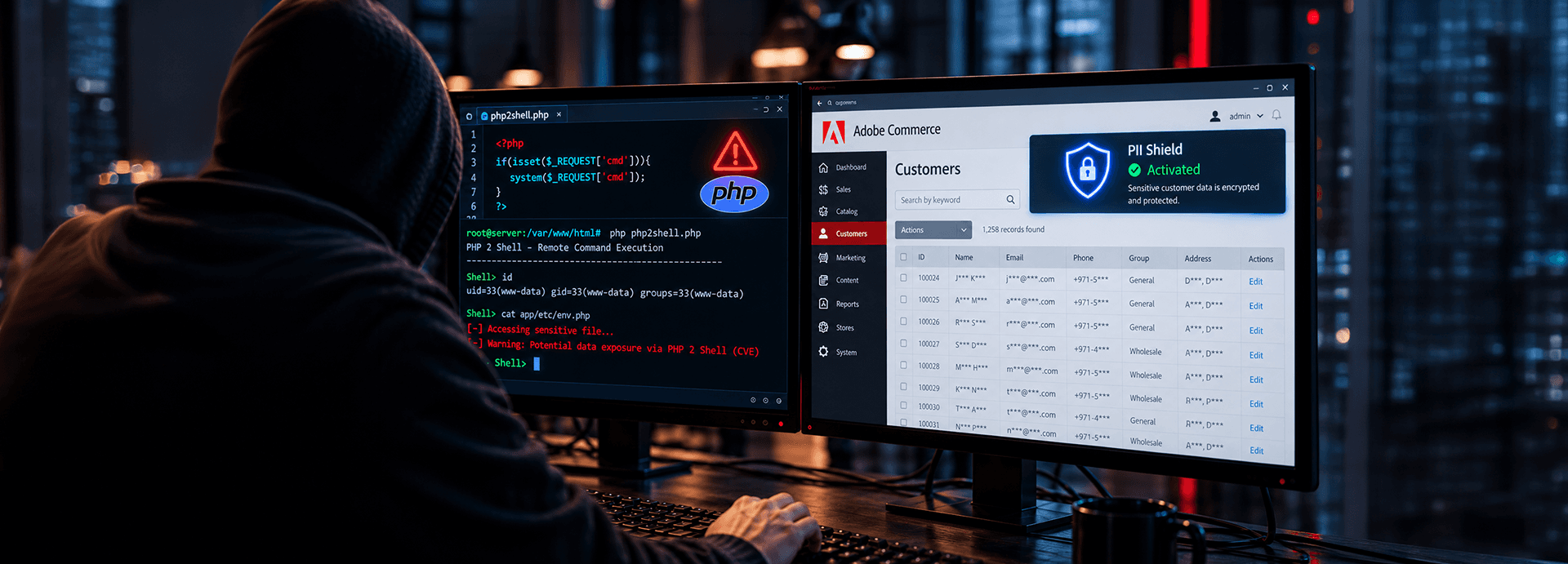
On 21 October 2026, PHP shipped emergency fixes for two critical vulnerabilities, CVE-2026-109618 and CVE-2026-109619, known as PHP2Shell. This guide answers three questions: Is our store exposed, who fixes it, and what should we check once the patch is on?
PHP2Shell involves two flaws in the PHP runtime itself, both rated critical with a CVSS score of 9.2 out of 10. When PHP aborts a request mid-task, it can leave memory in a broken state that a later request can abuse: a use-after-free condition (a memory bug where software keeps using memory after releasing it, letting an attacker place their own data there). The result is remote code execution (an attacker runs their own commands on your server from the internet) without a login.
PHP processes each request before Adobe Commerce code runs, so clean code and audited extensions often make no difference. Any web-facing PHP setup is at risk, and Apache mod_php carries the highest risk.
"There are no complete mitigations; updating is the only safe choice." PHP Security Team, PHP2Shell advisory.
Adobe Commerce stores on an unpatched PHP build are exposed to PHP2Shell, and your deployment model decides who has to fix it.
Adobe operates the runtime. Confirm with your account team, and check any PHP middleware you host yourself.
Adobe manages the cloud infrastructure, and your team pins the PHP version in the application configuration. We found no Adobe guidance specific to these CVEs as of October 23, 2026, so open a support ticket and ask:
You or your hosting provider owns PHP. Update the PHP packages, then restart PHP-FPM or Apache so every worker loads the fixed version. Ask your host for written confirmation of the version now serving your store.
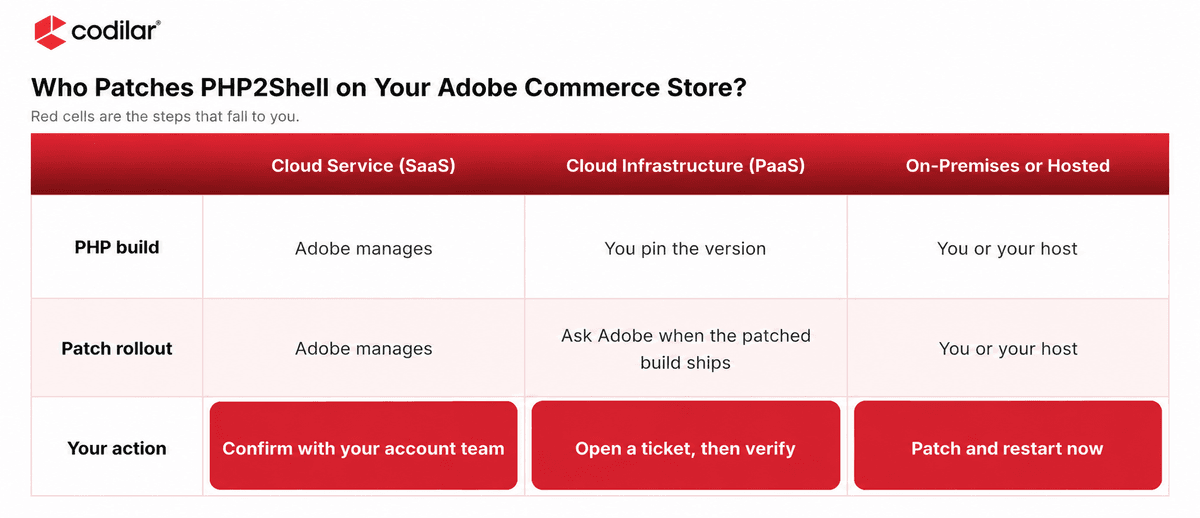
Your setup decides who patches. Assign one owner to confirm the fixed PHP version on every environment, staging included.
PHP released fixes only for 8.2 and newer. PHP 8.1 and older get no official release, so stores on those versions depend on vendor or community backports that someone has to apply and test.
Per Adobe's system requirements:
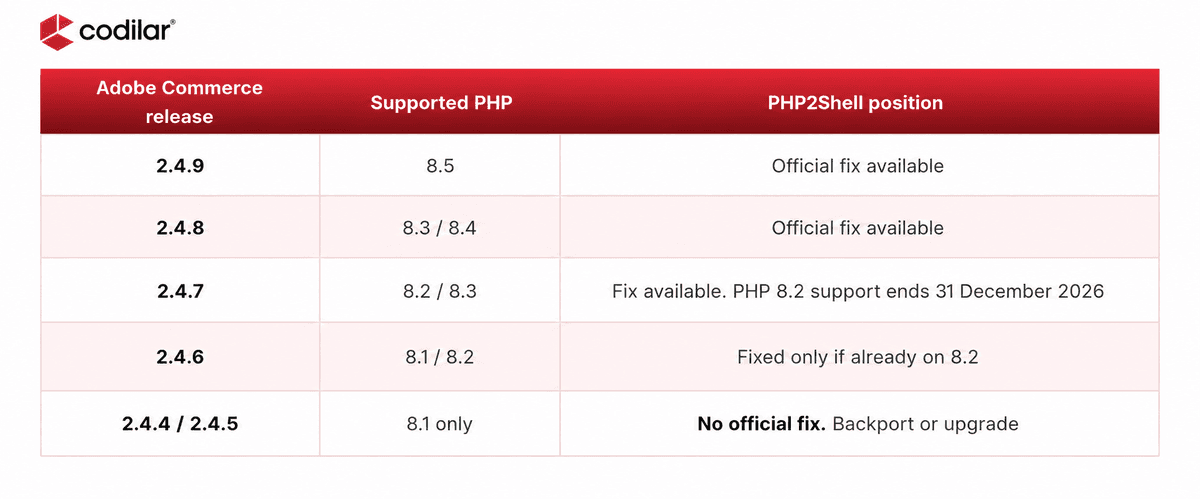
On Adobe Commerce 2.4.4 to 2.4.6, plan two moves. First, secure the store on your current PHP version. Apply a vendor or community backport of the fix and the interim hardening settings, and test them before they reach production. Then upgrade Adobe Commerce onto a supported PHP version.
According to Adobe’s lifecycle policy, PHP 8.1 reached end of life on December 31, 2025, and Adobe warns that PCI compliance is at risk for stores still running it.
Check from a web request. The command-line binary can differ from the one serving pages, so verify through the web server or hosting dashboard.
Patched versions: 8.5.12, 8.4.27, 8.3.36 and 8.2.35. Restart PHP-FPM or Apache, because running workers keep old code in memory.
Settings PHP suggests while you patch:
What not to rely on:
Maintenance mode and error suppression do nothing here, because PHP handles the request first. A WAF helps but is not a fix. According to Cloudflare, attackers were mutating their payloads to get past its rules.
Test checkout, payments, search, integrations and admin uploads on the patched build.
Amazon's honeypots recorded an exploitation attempt on 17 October, four days before the fix existed.
As of October 23, 2026, we found no public report of a confirmed breach. A missing confirmation does not prove your store is clean, and the patch does not remove anything that got in before it.
Review activity from 17 October for:
Rotate API tokens, integration keys, admin and database passwords, and payment gateway keys used during the exposure window.
Check the Security Issues report in Google Search Console and crawl for pages you didn't publish.
If spam pages have already hurt your rankings, our SEO team can help you clear them from search results and win back lost traffic.
Encrypt Customer Data at Rest to Limit the Damage
Patching closes the way in. You also need to know what an attacker could read if they got through. Adobe Commerce hashes customer passwords and encrypts payment credentials, but names, email addresses, phone numbers and street addresses sit in the database as plain text. A leaked backup or a stolen database login exposes all of it.
PII Shield, Codilar’s field-level encryption framework built with Libsodium, helps limit that damage:
It does not replace patching. A copied database yields encrypted records that stay unreadable without the keys.
Start with a free PHP2Shell Exposure Check, run read-only and with your written consent, with findings in 48 hours. Where action is needed, our engineers patch PHP or secure the store within its current PHP version through tested backports, hardening and WAF virtual patching.
The target is 48 hours for standard environments, with checkout and integration regression-tested.
Compromise sweep, credential rotation, custom hardening and SEO clean-up.
Wiz said AI turned a long-standing flaw into a working exploit, so patch windows will keep shrinking.
We move stores onto supported PHP and Adobe Commerce releases and add PII Shield for field-level encryption. After the move, our managed services and DevOps teams keep your environment patched and monitored.
For JPW Industries, we run 24/7 server operations across six brand sites and act on vulnerability alerts the same day.
See what JPW Industries says about working with us.
Every PHP2Shell call we took this week started with 'Are we patched?' The better question is whether you could answer that in an hour, every time.❞

Shahed Jamal | Practice Head - Adobe Commerce
Adobe Commerce security depends on every layer beneath the storefront, and PHP2Shell sits in the lowest one. Update PHP on every environment, check for signs that someone got in before the patch, and set up monitoring so you can act on the next vulnerability the day it is announced. Book a free security check and we will review your PHP version and your Adobe Commerce release together.
Running another PHP platform? Read our guides for Magento and Pimcore.
Yes. Adobe Commerce runs on PHP, and PHP2Shell affects every PHP installation serving web requests. Who fixes it depends on your deployment: Adobe for Cloud Service, Adobe images plus your redeploy for Cloud infrastructure, and you or your host for on-premises and third-party hosting.
No. The flaws are in the PHP runtime, not Adobe Commerce code. You need PHP 8.5.12, 8.4.27, 8.3.36 or 8.2.35, or a vendor backport for older versions, then a restart of every PHP worker. Updating Adobe Commerce or extensions alone won't close it.
Yes. Ask Adobe Commerce Support whether the patched build has reached every environment, whether a redeploy is needed, and whether WAF protection covers all of them. Then review logs from 17 October for signs of compromise.
Yes, as a short-term measure. A tested backport, configuration hardening, and WAF virtual patching can secure a store within its current PHP version. It's a bridge, not a destination: PHP 8.1 is end of life, so plan an upgrade to 2.4.7 or later on PHP 8.3 or newer.
Review activity from 17 October for new admin users, unknown PHP files, unexpected cron jobs, PHP processes launching shells and unusual outbound connections. Rotate credentials used in that window and check Google Search Console for warnings. Treat anything unfamiliar as an incident.

Get tailored technology solutions to scale your retail business online
Request A Quote

Stay ahead with insights, trends, and brand success stories from the world of Digital Commerce.


